How to Identify Scam Text Messages (And What to Do)
What Is a Scam Text Message?
A scam text message — also called SMS phishing or smishing — is a fraudulent text sent by criminals pretending to be a trusted organization. The goal is always one of three things:
- Steal your personal information (name, SSN, card number, passwords)
- Get you to click a malicious link that installs malware
- Trick you into sending money directly
Scammers impersonate banks, government agencies, delivery companies, tech giants, and even your own phone carrier. The messages look legitimate at first glance — which is exactly what makes them dangerous.
7 Warning Signs a Text Message Is a Scam
These are the red flags that separate a scam text from a real one:
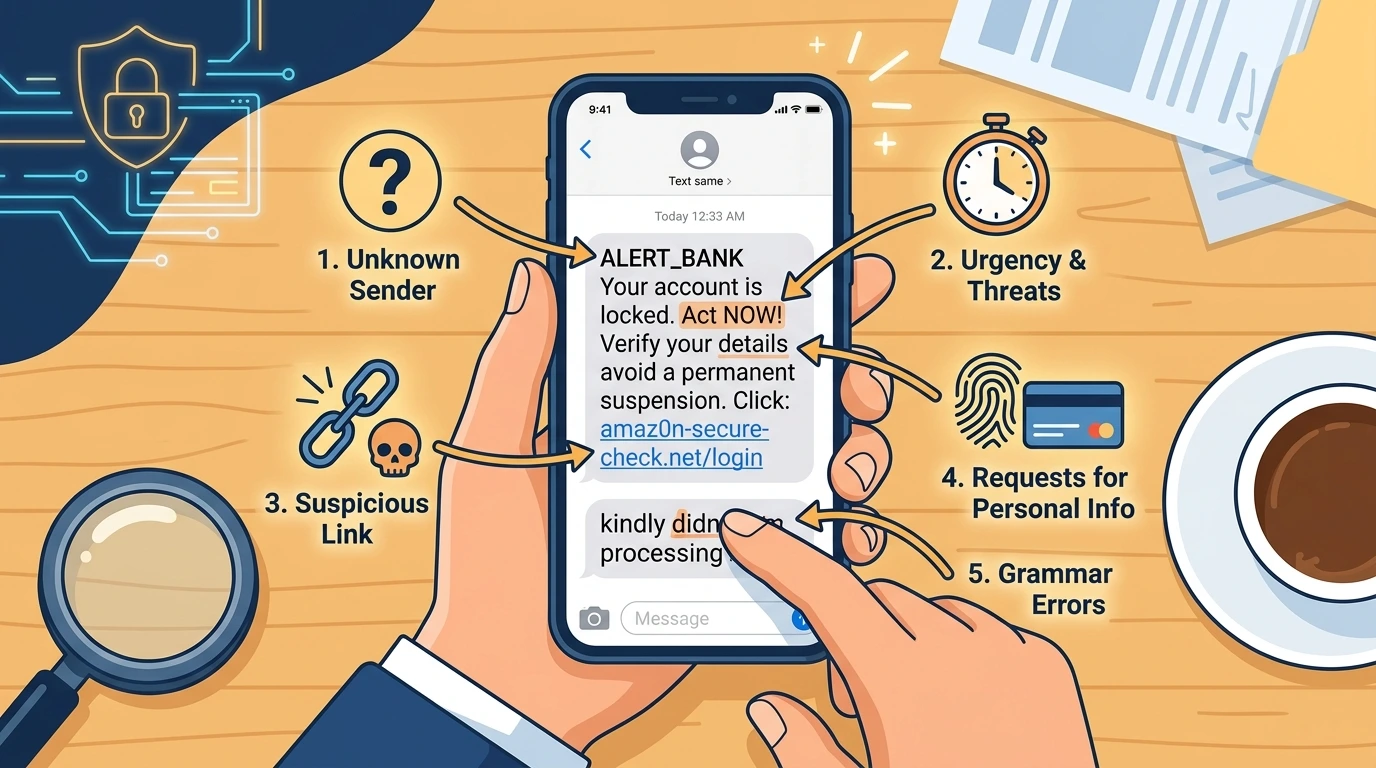
1. Unexpected urgency
Phrases like Act now, Your account will be suspended, or Respond within 24 hours are designed to make you panic and react without thinking. Legitimate companies do not threaten you via text.
2. Suspicious links
Scam links often use misspelled domains (amaz0n.com, appIe.com), random subdomains (secure.account-verify.net), or link shorteners (bit.ly, tinyurl) to hide the real destination. Never click a link in an unexpected text.
3. Requests for personal information
No bank, government agency, or legitimate company will ever ask for your full card number, PIN, password, or Social Security Number via text message. Ever.
4. Unknown or spoofed sender
Scammers use random phone numbers, foreign numbers, or numbers that look like local numbers. Some can even spoof legitimate numbers — making the text appear in the same conversation thread as real messages from your bank.
5. Grammar and spelling errors
Many scam texts originate from non-English speaking countries. Look for awkward phrasing, unusual capitalization, or sentences that do not quite make sense.
6. Prizes or rewards you did not sign up for
Congratulations, you have been selected or You won a $1,000 gift card — if you did not enter a contest, you did not win one.
7. Requests to pay via gift card or wire transfer
Any text asking you to pay a fee, fine, or bill using gift cards, Bitcoin, Zelle, or wire transfer is a scam. No government agency or legitimate business accepts gift cards as payment.
⚠️ Warning
Scammers can now spoof legitimate phone numbers — meaning a scam text can appear to come from your actual bank real number. If a text asks you to click a link or call a number, go directly to your bank official website or call the number on the back of your card instead.
The Most Common Types of Scam Texts Right Now
These are the scam text categories most reported in 2025-2026:
Bank Alert Scams
Fake texts pretending to be from your bank saying your account is locked, a suspicious transaction was detected, or your card has been compromised. They direct you to a fake login page to steal your credentials.
Package Delivery Scams
Fake texts from FedEx, UPS, USPS, or DHL saying your package is held and you need to pay a small fee or confirm your address. The link leads to a fake payment page.
Toll Road Scams (E-ZPass, SunPass)
Texts claiming you have an unpaid toll and must pay immediately or face a fine. A major scam wave hit the US in 2024-2025 with millions of these texts sent daily.
IRS and Government Scams
Fake texts from the IRS, Social Security Administration, or USCIS claiming you owe money, your number was suspended, or you have unclaimed benefits.
Job Offer Scams
Texts offering easy remote work with high pay. After you engage, they ask for personal information or an upfront payment for training materials.
Crypto and Investment Scams
Texts claiming you have unclaimed crypto, or that someone wants to teach you a trading strategy. These are pig butchering scams that can drain victims of thousands.
What to Do When You Receive a Scam Text
- 1
Do not click any links
The moment you suspect a text is a scam, stop interacting. Do not click any links, call any numbers in the text, or reply. Even replying STOP to a scam text confirms your number is active and can lead to more scam messages.
- 2
Check the link without clicking
If you are unsure, you can paste the URL into WhatIsThisCharge.net Scam Detector or a tool like Google Safe Browsing to check if it is malicious — without actually visiting the site.
- 3
Verify directly with the organization
If the text claims to be from your bank, delivery company, or government agency — go directly to their official website or call the number on the back of your card. Do not use any contact information provided in the suspicious text.
- 4
Block the number
Block the sender on your phone immediately. On iPhone: open the message, tap the number, then Block this Caller. On Android: open the message, tap the three dots, then Block number.
- 5
Report the scam text
Forward the scam text to 7726 (SPAM) — this works on all major US carriers and helps them block the number for other customers. You can also report it to the FTC at ReportFraud.ftc.gov.
- 6
Monitor your accounts if you clicked
If you already clicked a link or entered information, change your passwords immediately, enable two-factor authentication, monitor your bank accounts for unauthorized charges, and consider placing a fraud alert on your credit file at Equifax, Experian, or TransUnion.
Tips to Protect Yourself from Text Scams
Never click links in unexpected texts — go directly to the official website instead.
Enable spam filtering on your phone: Settings → Messages → Filter Unknown Senders (iPhone) or use Google Messages spam protection (Android).
Use WhatIsThisCharge.net Scam Detector to instantly check any suspicious text, link, or email.
Register your number at DoNotCall.gov — it will not stop all scams but reduces some categories.
Set up real transaction alerts with your bank so you know immediately if any unauthorized charge hits your account.
Warn elderly family members — they are disproportionately targeted by text scams and less likely to recognize them.
Frequently Asked Questions About Scam Text Messages
💡 Tip
Got a suspicious text right now? Paste it into the free Scam Detector at WhatIsThisCharge.net — it analyzes the text, links, and sender patterns in seconds and tells you if it is a scam.
Was this article helpful?